In this article we are informing you about the free Macro automation software. But instead of describing first you need to know that for what reason it should be meant. So, the reason is sometimes you feel annoyed and worn out when you perform the same task over and over again on your computer system. Now, we have defined you the free Macro automation software, mainly meant for recording your repetitive tasks on your computer system.
This is a piece of software which mainly used to record user actions for the playback at a later time. Well, it performs the difficult operations more rapidly and with fewer efforts without requiring the custom computer scripting or programming. It is simply a tool that used to record your repetitive procedures on your system such as clicks, mouse movements, keystrokes or so on for playback later. These software also helps you to execute a difficult task line, record your automating tasks and also writing your own sophisticated macro script for playback. Here, we have compiled top 7 free macro automation software.
Top 7 Free Macro Automation Software:-
- WinMacro:

WinMacro is one of the simple Macro player or recorders for Windows that are using window hooks to replay or record keyboard and mouse actions that you can perform on a desktop. It has many features such as options of ignoring mouse procedures during recording and user-configurable hotkeys to start playback and recording.

Do it again is one of the free macro automation software that permits you to make your system automatically do a task for you or whenever you want. It mainly supports easy text-based editing of task files. This software offers many other features to control playback of tasks.
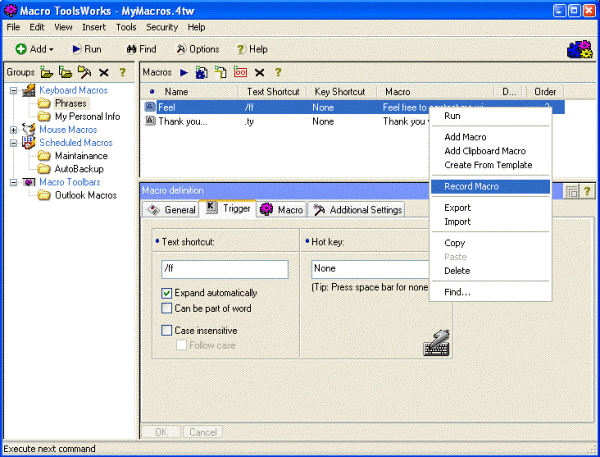
The macro tool works come in three editions which are professional, standard and free. It’s a powerful macro automation software which supports macro commands like sending emails, variables, FTP, finding a picture on a screen, manipulating windows and so on.

Mini Mouse Macro is one of the free macro automation software which is a light weight keyboard and mouse macro recording machine. Well, it is different from another macro mouse out there because this records actively the movement of the mouse, keys, and clicks. This software mainly helps for recording your actions in a real time. It has many great features but the main is the capability to protect your macros plus load up any macro when you need it. This is portable means single executable file.

GhostMouse permits you to automate or record a series of keystrokes, mouse clicks on a Windows computer. So, to start first the recording process, you need to hit record after that start stimulating the mouse and keyboard actions you would wish a function to record. GhostMouse is compatible with 64-bit systems, Windows 7, Windows 10 and Windows 8.
- Macro Dollar:

Macro Dollar is one of the free macro automation software. This is a portable and tiny macro recorder that can simply capture mouse clicks and movements, keyboard events. It easily comes to playing and recording scripts for repetitive tasks without client assistance.
- Mouse Recorder Pro:

Mouse recorder pro is an advance solution which is mainly design to record the process of your keyboard and mouse. It is created by the talented man named Shay from Israel. This software offers you more plus record and playback the macro automation software.